v0.9 Release

This post provides a quick overview of the work that has gone into OPA v0.9. As usual, the release is published on GitHub Releases and Docker Hub.
Securing the Data Lake: Ceph and Minio Integrations
During this release cycle we worked with the upstream Ceph and Minio communities to introduce fine-grained access control into data lakes using OPA. Both Ceph and Minio support the standard S3 object storage APIs and are popular choices for deploying object storage services.
The integrations into Ceph and Minio allow administrators to express fine-grained attribute-based access control (ABAC) policies over requests to the object storage layer. Compared to Bucket Policies and Object ACLs, these integrations give administrators greater control over sensitive data stored in these services. Using OPA you can enforce policies over object and file access based on context such as:
- Time of day
- Multi-Factor Authentication (MFA) attributes
- Geographic region of the connecting client
We expect to see more adoption of OPA to control access to sensitive data as more and more organizations build out data lakes using object storage services like Ceph and Minio.
For more information on the integrations see the PRs:
Profiling Policy Evaluation
OPA now includes a command-line tool that helps you understand the performance of your policies.
Given a policy query, the tool reports per-expression metrics including:
- Time spent evaluating each expression (non-recursive)
- Number of times each expression is called from the outside
- Number of times each expression is re-evaluated due to backtracking
The need for profiler support became obvious after reviewing and optimizing several large policies. These policies relied on sophisticated search logic split across hundreds of lines of policy statements in multiple files. In many cases it was possible to improve performance significantly by simply tweaking how context was structured.
We hope that by providing a profiler, policy authors will be able to quickly identify the root cause of performance issues.
You can invoke the profiler on the command line via the opa eval subcommand. For example:
opa eval data.rbac.allow --data rbac.rego --format pretty --profile
By default, when profiling is enabled, OPA will output the top 10 most expensive expressions in the policy.
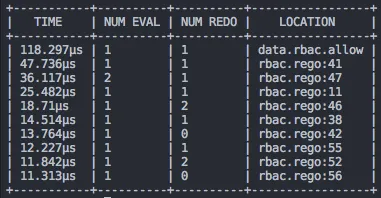
Example profiler output.
For more information on the profiler tool, see the new documentation page describing how to test your policies.
Compile API
Finally, as of v0.9, OPA includes new APIs that allow callers to invoke Partial Evaluation via HTTP or in Go with the Rego package.
In the past, decisions returned by OPA were always definitive, e.g., callers would query for an "allow" or "deny" decision and the answer would always be "true" or "false". With partial evaluation exposed, OPA can return condition answers, e.g., "allow" is "true" if certain conditions are satisfied.
Later this week we will publish a blog post that describes how you can enforce data filtering policies in your storage layer with OPA by leveraging the new Compile API.